
在之前的博客中,我们探讨了 GitHub Actions 在 CI 管道中自动触发操作的能力,并介绍了如何在 AWS Spot 实例中使用 GitHub Runner 获得更多灵活性,以及如何在 C++ 项目中使用 GitHub Actions。
这篇文章将进一步介绍如何集成 GitHub Actions 与 Incredibuild(我们已经在社区论坛上讨论过这一话题,但在这里,我们将作进一步探讨)。
我们的讨论涉及两种通过 Incredibuild 触发 GitHub Actions 的可行办法,即通过合并拉取请求或任何其他触发器实现构建分发和加速。
其中的原理十分简单,即将 Incredibuild 的构建分发添加到您的 CI 管道中,以实现构建加速。需要注意的是,尽管我们在下文介绍的是 GitHub Actions 集成的具体内容,但这种方式也同样适用于其他环境(例如Jenkins、GitLab CI、Bitbucket 管道、Travis CI、TeamCity 等),应用的是相同的原理,并采用同样的步骤和配置。如果您正在使用特定的 CI 管道,您可能会发现,Incredibuild 提供的加速能力可以带来更强大的性能并优化您的管道流程。我们十分推荐您进行试用。
我们将会了解两种可行架构,相应架构在运行器承载的方式上有所不同,并且我们还会讨论使用两种架构的利弊。针对这两种架构,您需要:
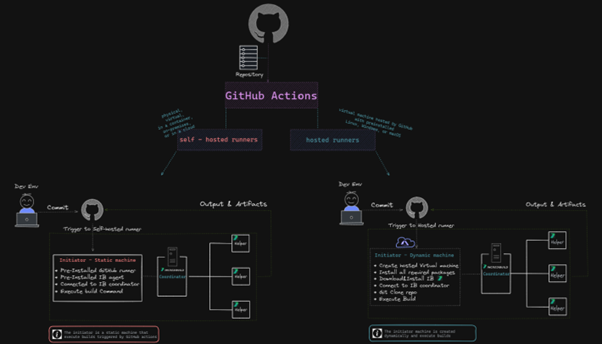
该高级架构十分简单,即从推送事件到项目仓库触发 CI 工作流程。GitHub Actions 将处理事件并触发 Incredibuild Coordinator 服务器上的构建作业,之后该服务器会将构建分发给 Incredibuild 代理(在我们的案例中,代理运行在其他 AWS 节点上)。
我们将以自托管运行器或 GitHub 托管运行器的形式呈现由 GitHub 触发的操作。在我们的案例中,两者的区别在于激活构建的启动器是在 GitHub 环境中(GitHub 托管运行器案例)还是外部计算机(自托管运行器)上运行。
如需了解 GitHub 托管运行器和自托管运行器的区别,请查看该 GitHub 文档页面。
以下是该高级架构的详细展示:
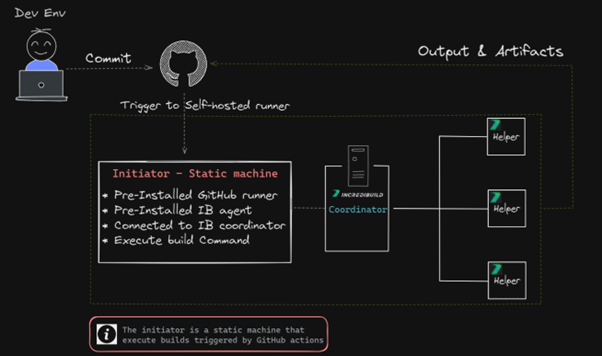
步骤
mkdir actions-runner

cd actions-runner

Invoke-WebRequest -Uri https://github.com/actions/runner/releases/download/v2.285.1/
actions-runner-win-x64-2.285.1.zip -OutFile actions-runner-win-x64-2.285.1.zip

Add-Type -AssemblyName System.IO.Compression.FileSystem ;
[System.IO.Compression.ZipFile]::ExtractToDirectory("$PWD/actions-runner-win-x64-2.285.1.zip", "$PWD")
./config.cmd --url https://github.com/<your-repo-here> --token <your-repo-token-here>
在同一文件夹中,运行 ./run.cmd 文件:
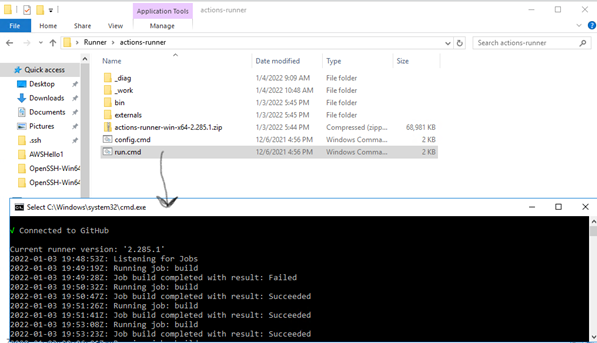
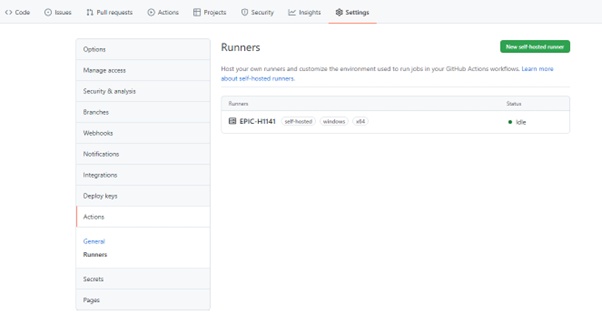
此时,运行器应能执行来自 GitHub Acftions 的命令,您将看到 GitHub Actions 列表已添加该运行器:
8.创建流程:
在 GitHub Actions 中,进入 Actions 选项卡,然后点击新建工作流程。
在列表中选择手动工作流程 > 配置

为流程命名(例如,build_flow.yml)
然后,将流程的内容替换为以下 YAML 内容:
# This flow will launch the instance where the Runner os listening and will execute the run command
name: IB trigger
# Controls when the workflow will run
on:
# Triggers the workflow on push or pull request events but only for the master branch
    push:
        branches: [ master ]
    pull_request:
        branches: [ master ]
jobs:
    # This workflow contains a single job called "build
    build:
    # The type of runner that the job will run on
    runs-on: self-hosted
        # Checks-out your repository under $GITHUB_WORKSPACE, so your job can access it
        - uses: actions/checkout@v2
        # Runs a single command using the runners shell
        - name: Run Rebuild batch file and distribute the tasks within IB helpers
        run: powershell <path_to_your_project_location>ConsoleAppRebuild.bat
项目位置的路径应与在 config.cmd 行中创建的路径一致
这样就大功告成了。所有内容现在都设置为一旦拉取请求经过确认,便通过 Incredibuild 执行构建。如需跟踪 Incredibuild 仪表板或 Visual Studio 中显示的相同输出的构建进度,请前往 GitHub中的Actions>Allworkflows菜单。
安全和执行策略相关说明
如出现以下与执行策略相关的错误:
File <file_name> cannot be loaded because running scripts is disabled on this system.
需要在 PowerShell 窗口中输入以下内容,将执行策略设置为管理员:
Set-ExecutionPolicy RemoteSigned
可以通过以下方式恢复策略默认值:
Set-ExecutionPolicy Restricted
更多与信息和安全性相关的内容,请参阅 GitHub 自托管运行器安全文档。
下面的视频演示了具体的流程:
下面的速写图展示了该高级架构的详细信息:
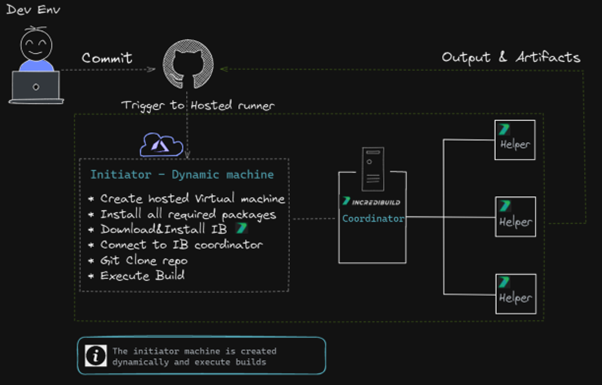
步骤
在该案例中创建工作流程的步骤与创建自托管工作流程的步骤相同:

name: Build on Windows
on: push
jobs:
  build:
    runs-on: windows-2019
    steps:
      -  run: |
          choco install wget -y
          cd C:
          wget "https://<aws-node>.amazonaws.com/IBSetupConsole.exe" -O "C:IBSetupConsole.exe"
          ./IBSetupConsole.exe /Install /Components=Agent /Coordinator=<ec2-address> /AddToPath=ON /Agent:InstallAddins=OFF
          New-Item -Path 'HKLM:SOFTWAREWOW6432NodeXoreaxIncrediBuildLog'
          New-ItemProperty -Path 'HKLM:SOFTWAREWOW6432NodeXoreaxIncrediBuildLog' -Name 'Level' -Value "4" -PropertyType String -Force

      - name: Add msbuild to PATH
        uses: microsoft/setup-msbuild@v1.1

      - name: Clone Repository and Rebuild with Incredibuild
        run: |
            cd C:
            git clone <GitHub project>.git
            cd C:TestBAC-100-
            $env:Path = '<IB Path>IncrediBuild'
            BuildConsole.exe '<project>.sln' /rebuild /cfg="Debug|x64" /usemsbuild

      - name: Upload artifacts
        if: always()
        uses: actions/upload-artifact@v2
        with:
           name: my-artifact
           path: |
             <IB Path>IncrediBuildHistory
             <IB Path>IncrediBuildLogs
当然,您需要用适当的值替换 <IB Path>、<GitHub project> 等。
该 YAML 语言专门用于在 GitHub 托管运行器上运行 Incredibuild。但如果您想进一步理解该 YAML 语言,建议您参阅 GitHub 托管运行器文档。其主要原理就是脚本将在 GitHub 托管的计算机上运行!
您可能已经注意到,自托管和 GitHub 托管的区别在于 runs-on 参数的不同,自托管案例中为“自运行器”,而 GitHub 托管案例中为“windows-2019”。
这一示例如何运作?
下面的视频清楚演示了具体的流程:
GitHub托管运行器面临的挑战和限制
目前,GitHub 托管运行器和硬件资源十分有限,因此不适用于大型项目。详细的 GitHub 托管选项列表,请参见: GitHub 托管运行器 – 支持的运行器和硬件资源。
每次都需要在新创建的运行器上安装所有需要的包,因此比较耗费时间。
启动器和 Coordinator 的连通性较差,可能导致“任务受阻”,从而增加编译时间。
集成 Incredibuild 系统与 GitHub Actions 并不复杂。您可以通过不同的部署选项来实现集成,所有选项最终都将整合到一个简单的触发器中,通过 Incredibuild 无缝执行构建分发。通过在 CI 管道中添加 IB 构建分发并使用 GitHub Actions 支持的触发器,您将获得流畅的构建分发和加速体验。